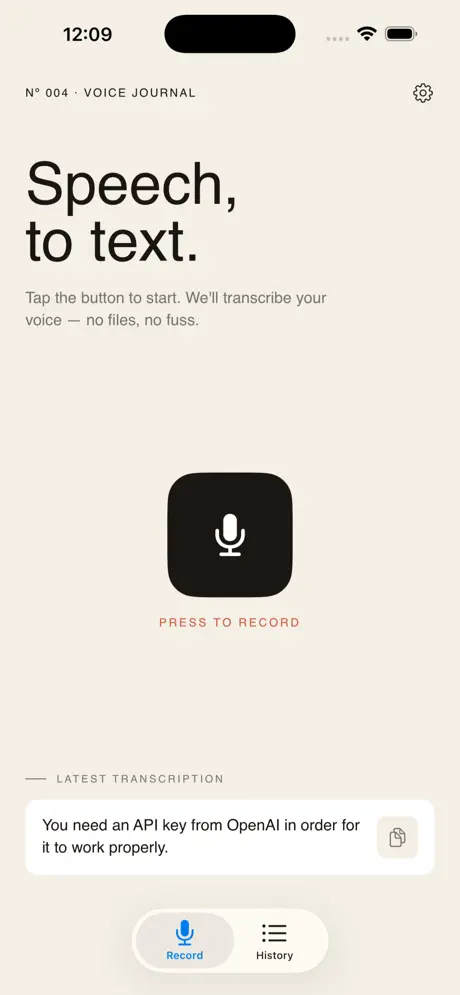
Speech to text, with a single tap
Tap once, speak, and get clean text ready to copy. On the Mac, hold a shortcut in any app and the text is pasted for you.
Download for MacmacOS 14 or later · Apple Silicon
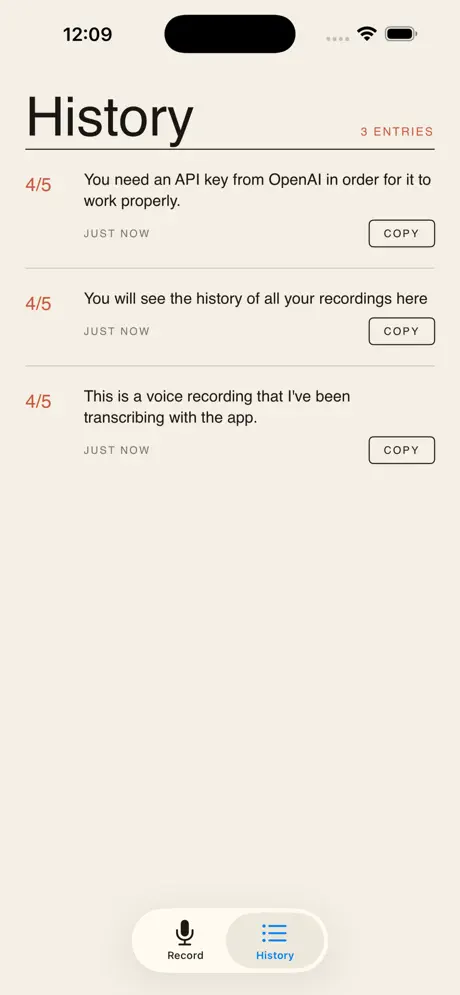
Speech to Text is the fastest way to get your spoken words into writing. Tap once, talk, and your voice becomes editable text you can use anywhere. There is no account and no API key to set up: you get free tokens to start, and buy more only if you need them.
On iPhone and iPad the workflow is Transcribe → Copy → Paste, and Universal Clipboard carries the text over to your Mac. On the Mac itself, the menu bar app skips the copy step: hold or tap a shortcut in any app, speak, and the transcript lands in the text field you were typing in.
Installing on Mac: download the zip, open it, and drag Speech to Text to your Applications folder. On first launch it asks to send audio for transcription, then for Accessibility access, which it needs to paste into other apps.
Features
- One-tap speech-to-text transcription powered by OpenAI
- No subscription and no API key: free tokens to start, then pay for what you use
- Instant copy of the transcribed text to your clipboard
- Works across iPhone, iPad and Mac
- Native Mac menu bar app: hold a shortcut in any app, speak, and the text is pasted for you
- A clean, distraction-free workflow: Transcribe → Copy → Paste
Stop typing, start talking
Capture notes, ideas and meetings in seconds. Download Speech to Text and let your voice do the work.
See it in action