Create Your Own Custom GPT: A Guide for Business Owners


What is a Custom GPT?
A Custom GPT is a specially adapted version of GPT that has been configured based on specific needs and parameters. If you have a particular purpose or requirement, you can create a Custom GPT that is tailored for this purpose. This can be of great benefit for companies looking to streamline their customer service or improve internal processes.
Why Use Custom GPT?
You can, for example, upload a document, such as a product manual in PDF format, that your company's customer service needs knowledge about. When a question about the product comes up, you can ask the question directly to the GPT which answers based on the information in the document. The possibilities are practically endless - you can create a Custom GPT for almost anything.
Benefits of Custom GPT
- Reduced risk of hallucinations: By limiting training data to specific documents, the risk of incorrect answers is reduced.
- Easy to build: OpenAI has made it simple to create a Custom GPT with built-in features that guide you through the process.
- Specific use: A Custom GPT can be pre-prompted with relevant information, which saves time and reduces the need to constantly specify the context for your questions.
Custom GPT Use Cases
Custom GPT for Customer Service
A Custom GPT can be trained specifically on your product manuals and documentation. This means that customer service staff can quickly get accurate answers to specific product questions without having to search through extensive material.
Custom GPT for Marketing
Custom GPTs can be used to generate marketing material, blog posts, social media posts, and newsletters. By training the model on the company's tone and style, you can ensure that all content is consistent and engaging, saving time for the marketing team.
Custom GPT for Data Analysis
Custom GPTs can automate the process of compiling and analyzing data, as well as generating reports. This can help companies quickly gain insights and make data-driven decisions without having to spend much time on manual work.
How to Create a Custom GPT
Step-by-Step Guide
-
Go to chat.openai.com and log in
-
Click on Explore GPTs in the side menu
-
Click on Create
-
Fill in the name, description, and instructions you intend to give to the GPT
-
Click on Save and choose how you want to share your custom GPT
-
Click on Confirm
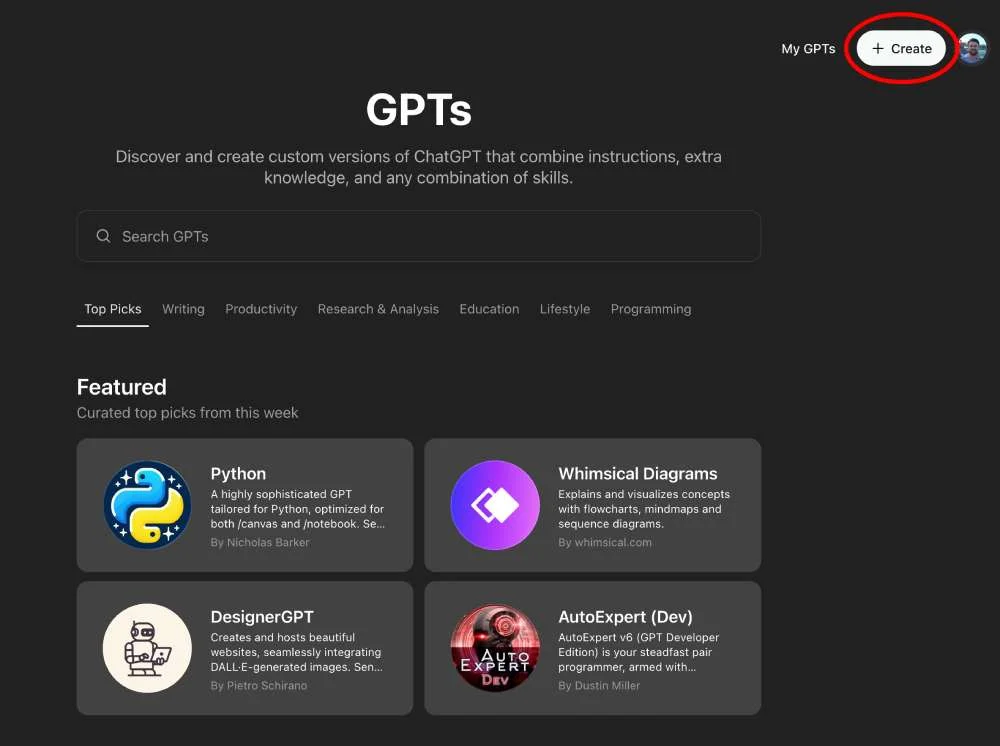
By following these steps, you can easily build a Custom GPT that suits your specific needs.
If you want help building your own Custom GPTs, we run workshops and consulting engagements.
Custom GPTs in 2026
Custom GPTs are still very much alive. You find and run them through the GPT Store at chatgpt.com/gpts, and they're now available to all signed-in users — but creating your own requires a paid ChatGPT subscription. Companies on Team and Enterprise can also publish internal GPTs privately within their organization.
One thing worth knowing: a Custom GPT is perfect for well-defined tasks (answering from your documents, keeping a certain tone). If you need something that does things in your systems — books meetings, updates records, runs multiple steps — a proper AI agent is often the better choice.
Tips for Effective Use
- Use the @ symbol: To quickly access your Custom GPTs, you can type "@" in the text field. This feature was launched in February 2024 and makes it easier to switch between different GPTs.
- Simplify repetitive tasks: If you often need to, for example, translate text, you can create a Custom GPT for this purpose. This means you don't have to write "translate to XX" every time.
Updated: 2026-07-03