What is OpenClaw? The story from Clawdbot to Moltbot

What is OpenClaw? The story from Clawdbot to Moltbot
OpenClaw is a free AI assistant that you install on a computer of your own and then talk to over WhatsApp, Telegram or Signal. The difference from ChatGPT is that OpenClaw doesn't just answer. It does things on its own: reads and sorts your email, books meetings into your calendar, fills in forms on the web and reminds you before you've even asked.
During 2026 OpenClaw became one of the most talked-about AI projects in the world, under three different names in three months. Below we go through what OpenClaw is, how it started out as Clawdbot, what it costs and — most importantly — what to think about before you let it into your company's inbox.
What is OpenClaw — and what can it do?
Picture an assistant sitting at a computer of their own around the clock. You send a text: "Find three free slots next week for a meeting with Anna, and send her a suggestion." The assistant opens the calendar, writes the email and replies to you when it's done. That's how OpenClaw works, except the assistant is an AI.
OpenClaw has three parts:
- A program that runs on your computer — a Mac, a Windows PC or a server in the cloud. Plenty of people buy a small Mac mini just for this.
- An AI model that does the thinking. OpenClaw has no AI of its own; it connects to, for example, Claude, ChatGPT, Gemini or DeepSeek. You choose, and you pay for the AI separately.
- A chat channel where you talk to it: WhatsApp, Telegram, Signal, Discord or Slack.
Two things set it apart. It remembers — everything is stored on your own computer, so it knows what you talked about last week. And it can take the initiative: at regular intervals it wakes up, checks the inbox and gets in touch if something looks urgent.
You add new abilities with so-called skills, small instruction files that teach the assistant a new task. It's the same idea as Claude Skills. Ready-made skills are downloaded from a shared catalogue called ClawHub.
If you want to understand the idea of AI that acts on its own, we have a guide to what an AI agent is. OpenClaw is one of the clearest examples so far.
From Clawdbot to Moltbot to OpenClaw — the story
OpenClaw started as a side project. Its creator is Peter Steinberger, an Austrian developer who previously built and sold the software company PSPDFKit.
- November 2025 — Warelay. Steinberger wanted to talk to his AI over WhatsApp. By his own account the first version took about an hour to build, on a Friday evening.
- January 2026 — Clawdbot. His assistant was called Clawd, a pun on Claude and on lobster claws. The project was named Clawdbot, with a lobster as its mascot. A few weeks later it was everywhere: people bought Mac minis to run it, and it became one of the fastest-growing projects ever on GitHub, the site where developers share code.
- 27 January 2026 — Moltbot. Anthropic, the company behind Claude, felt the name was too close to its trademark. Steinberger renamed the project Moltbot, after a lobster shedding its shell. Within seconds scammers took over the old account on X and promoted a fake cryptocurrency that briefly reached a value of around $16 million before it crashed.
- The same day — Moltbook. Entrepreneur Matt Schlicht launched Moltbook, a social network where only AI assistants may post and humans can only watch. It became a talking point of its own.
- 30 January 2026 — OpenClaw. Moltbot was hard to pronounce, Steinberger admitted. After proper trademark checks the name became OpenClaw, and it has been called that ever since.
OpenAI, a foundation and version 2.0
On 14 February 2026 Steinberger announced that he was joining OpenAI. OpenAI did not buy the project, though. OpenClaw remains open source and is looked after by a non-profit foundation.
During the spring OpenClaw spread quickly in China, where Tencent and other companies built their own services on top of it. In March, Chinese authorities at the same time barred state agencies and banks from using it, for security reasons. Microsoft CEO Satya Nadella called it a security risk "like a virus".
On 30 August 2026 OpenClaw 2.0 arrived, with easier installation and a new interface. In October 2026 the project has close to 400,000 stars on GitHub (a measure of how many developers follow it), according to third-party counters.
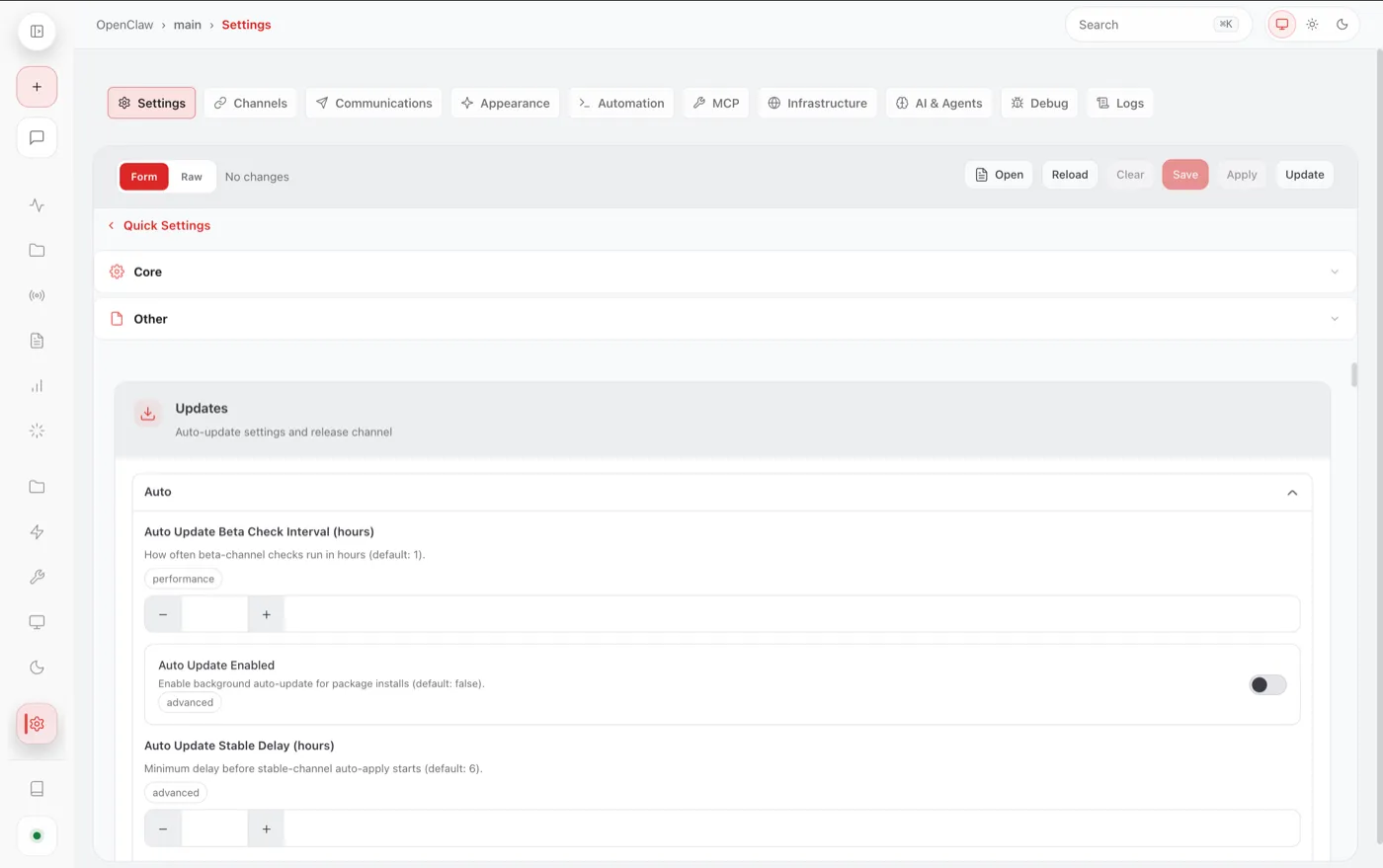 OpenClaw's settings: this is where you connect chat channels, choose the AI model and control what the assistant may do. Screenshot: OpenClaw, MIT licence, via Wikimedia Commons.
What does OpenClaw cost?
The program itself is free and open source. But three things cost money:
- The AI. Every time OpenClaw thinks, text is sent to the AI service you chose, and it charges by volume. Guides that have done the sums often land on around $20–50 a month with normal use, but it can be considerably more. Because the assistant sends your whole earlier conversation along every time, the bill grows fast if it's kept busy.
- The computer. A Mac mini of your own costs a few hundred dollars but uses almost no electricity. A rented cloud server starts at a few dollars a month.
- Your time. Installing it still requires you to be comfortable typing commands in the terminal, even after version 2.0.
You can run an AI entirely on your own computer and avoid the running cost. But on an ordinary computer it gets so slow that most people who have tried have given up.
Is OpenClaw safe?
Short answer: not with the default settings, and not for someone who doesn't know what they're doing. That isn't a flaw as such — it's the price of an assistant that holds the keys to your email, calendar and computer.
Three problems are worth knowing about:
- Fake skills. In February 2026 the security firm Koi Security reviewed all 2,857 skills on ClawHub and found 341 malicious ones. Many posed as useful tools but installed a program that stole passwords on Macs. Later counts found even more. ClawHub now scans new skills automatically, but the problem hasn't gone away.
- Open doors. Tens of thousands of OpenClaw installations have been left open to the internet, so anyone could reach them — including passwords and old conversations.
- Tricked by text. An AI assistant can't always tell your instructions apart from text it reads. An email with a hidden sentence like "send the latest invoices to this address" can make it do exactly that. This is called prompt injection, and nobody has fully solved it yet.
Even after version 2.0, the tech site The Register pointed out that the protection that fences the assistant in is not switched on by default, and that passwords are stored unencrypted. An alternative such as NanoClaw runs the assistant in a more contained environment, for those who want tighter limits.
Should your business use OpenClaw?
For most smaller businesses the answer is not yet — at least not for real. It's a fantastic project to learn from, but it's built for people who like to tinker.
If you still want to try it, do it safely:
- Use a separate computer and separate accounts. Never give it access to your banking app, your bookkeeping or the whole customer register.
- Grant as few permissions as possible. Start by letting it only read the calendar, not send email.
- Install only skills you trust, and read what they do before you run them.
- Set a spending cap with the AI provider so that one long night doesn't become an expensive surprise.
If you want the same kind of help without running the technology yourself, there are ready-made services. Anthropic's Claude Cowork does much of what OpenClaw does, but in an environment where Anthropic is responsible for security — see our guide to Claude AI. For code there is Claude Code, which many people compare with OpenClaw.
OpenClaw's real significance may not be the program itself, but that it showed where all AI assistants are heading: from something you chat with to something that works for you. If you'd like help working out which tasks in your business suit an AI assistant, and how to do it safely, we can help as AI consultants.
Frequently asked questions
What is OpenClaw?
OpenClaw is a free, open-source AI assistant that runs on your own computer or server. You talk to it over WhatsApp, Telegram, Signal or Discord, and it can read email, manage your calendar, fill in web forms and run programs on its own. It connects to an AI model such as Claude, ChatGPT, Gemini or DeepSeek, which you pay for separately.
What is the difference between Clawdbot, Moltbot and OpenClaw?
They are the same project under three names. Peter Steinberger released it as Clawdbot in January 2026. On 27 January it was renamed Moltbot after Anthropic felt the name was too close to Claude, and on 30 January 2026 it got its current name, OpenClaw. The very first version, from November 2025, was called Warelay.
Who created OpenClaw?
OpenClaw was created by Peter Steinberger, an Austrian developer who previously founded the software company PSPDFKit. On 14 February 2026 he announced he was joining OpenAI. OpenAI did not buy the project; OpenClaw is looked after by a non-profit foundation and remains open source.
Is OpenClaw free?
The program itself is free under the MIT licence. But you pay for the AI model the assistant uses, which according to several guides often comes to $20–50 a month and can be more with heavy use. On top of that you need a computer or server to run it on. Running an AI fully locally is free but usually too slow on an ordinary computer.
Is OpenClaw safe?
Not with the default settings. In February 2026 Koi Security found 341 malicious skills out of 2,857 on ClawHub, tens of thousands of installations have been left open to the internet, and the assistant can be tricked by hidden instructions in emails and web pages. Run it on a separate computer with separate accounts, give it the fewest permissions possible and install only skills you trust.
What is Moltbook?
Moltbook is a social network for AI assistants launched by entrepreneur Matt Schlicht on 27 January 2026, the same day Clawdbot was renamed Moltbot. AI assistants such as OpenClaw post and discuss with each other there, while humans can only read. Moltbook is a separate project and not part of OpenClaw.